
MTR path comparison
MTR Path Comparison See Every Hop, Spot Every Change
The smartest traceroute you’ve ever used. Visual path mapping, per-hop latency, AS-number intelligence, and automatic comparison across every run.
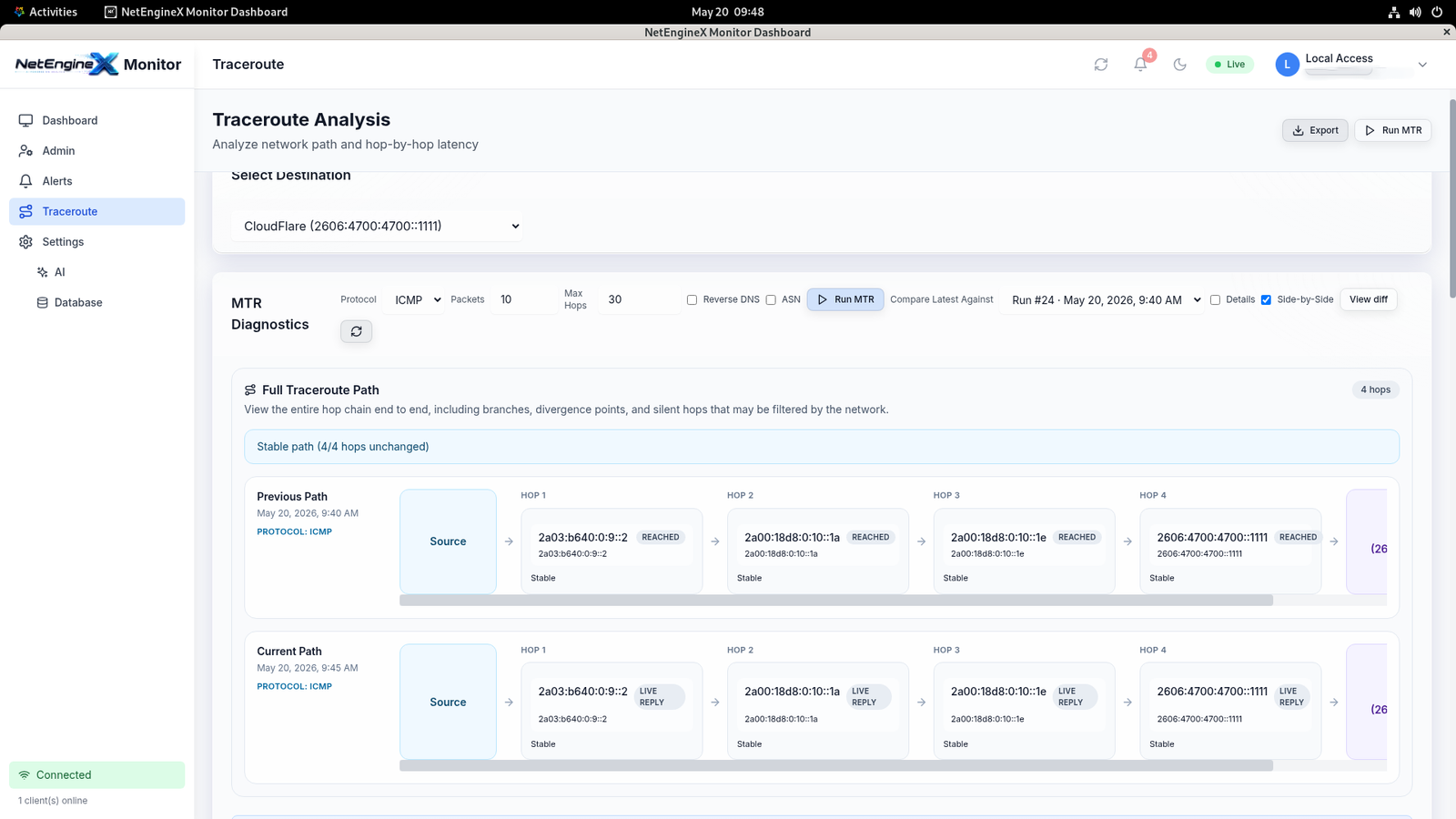
Why Traceroute Needed a Rebirth
Every network engineer knows the pain. A user reports slowness. You open a terminal, run mtr or tracert, squint at columns of IPs and millisecond values, and try to reconstruct what’s happening all from a wall of text that goes stale the moment you close the window.
Then comes the harder question: “Did the path change?” You scroll back through chat logs, screenshots, or scribbled notes from a week ago, comparing hop by hop, trying to spot a single misbehaving router buried somewhere in the middle of the internet.
NetEngineX Monitor’s MTR Path Comparison ends that struggle. It transforms traceroute from a one-shot diagnostic tool into a continuous, intelligent, visual path-analysis system and it’s the feature our users tell us they can’t live without.
“If something on the path between you and your destination changes anywhere on the internet, NetEngineX sees it. And shows it to you instantly.”
PROTOCOLS SUPPORTED
PATH HISTORY
MANUAL COMPARISON
What Makes It Different
Most traceroute tools give you a snapshot. NetEngineX gives you a timeline. Here’s exactly what’s inside the MTR Path Comparison module.
1
Run MTR to Any Target — Any Protocol
Trace the path to IPv4 addresses, IPv6 addresses, hostnames, or domain names. The interface is identical regardless of input type paste the target, click run, and NetEngineX handles resolution, probing, and rendering automatically.
2
Visual Path Drawing with Per-Hop Latency
Signature
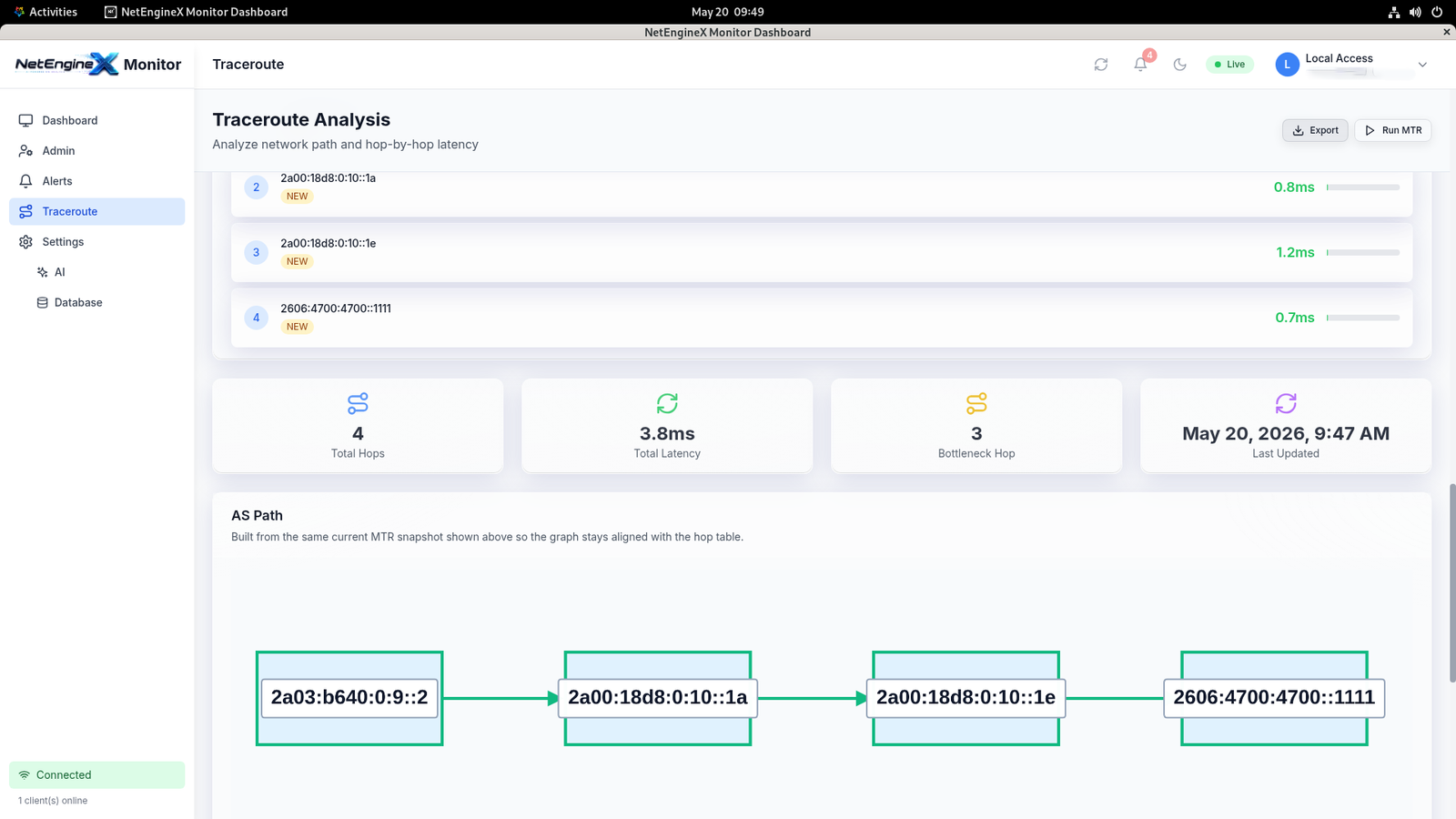
Forget walls of text. NetEngineX draws your network path as a clean, interactive diagram each hop rendered as a node, each segment showing latency, each step instantly readable at a glance. Spot bottlenecks visually in seconds instead of decoding raw output line by line.
3
AS Number Intelligence on Every Hop
Every IP on the path is automatically enriched with its Autonomous System (AS) number and owner. Instantly see when your traffic enters your ISP, transits a Tier-1 carrier, or crosses into the destination network no external lookups, no whois queries, no copy-pasting into third-party tools.
4
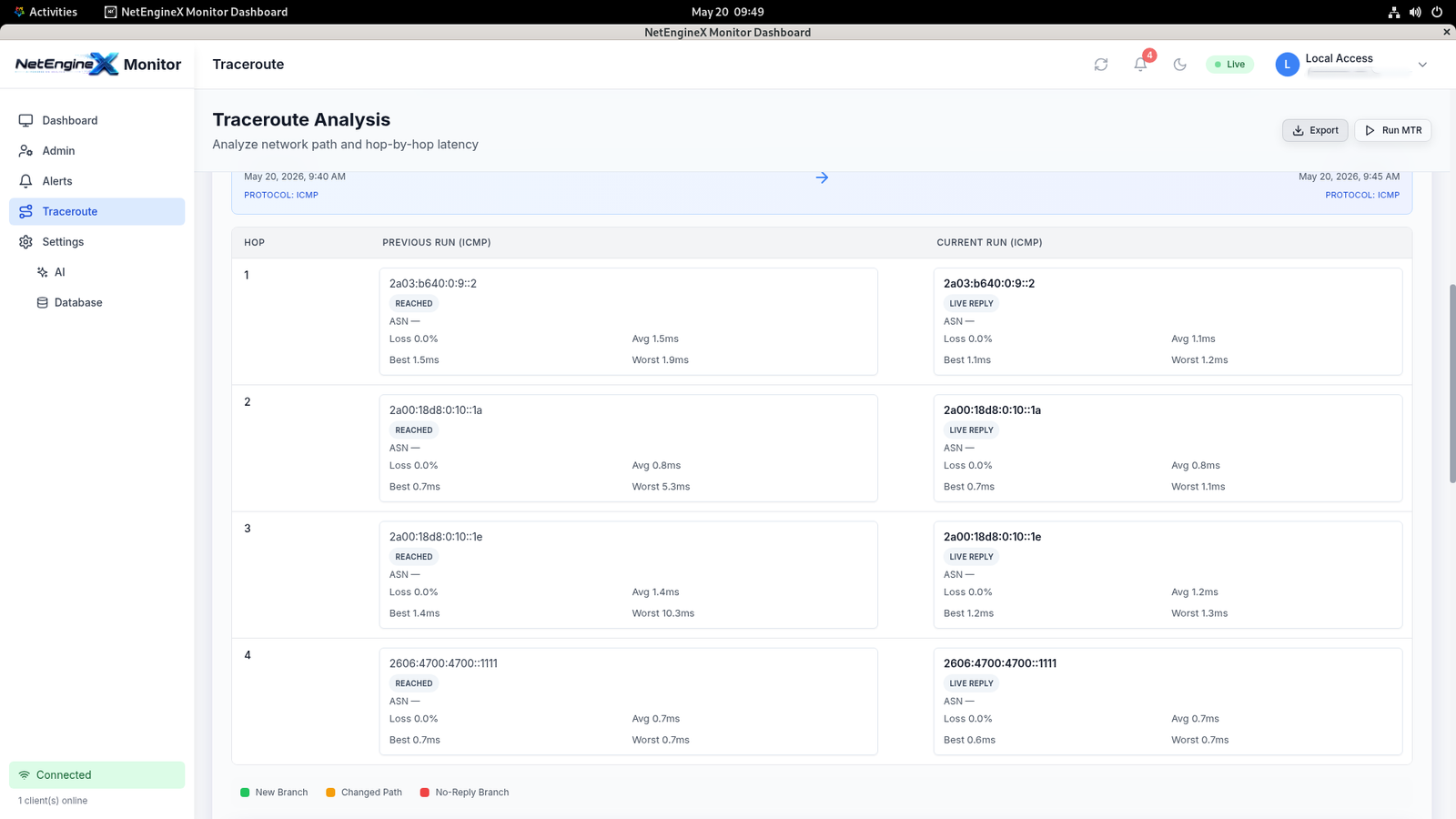
Automatic Path Comparison Across Runs
Signature
This is what sets NetEngineX apart. Every MTR run is saved automatically, and the system compares each new run against previous ones. If a hop changes, a new AS appears, latency degrades, or the path reroutes you’ll know. No manual diffing. No screenshot archaeology. Just instant clarity on what’s different and why it matters.
5
Scheduled MTR — Always-On Path Monitoring
Configure recurring MTR runs at the intervals you choose. NetEngineX continuously probes the path in the background and builds a complete historical record. Combined with automatic comparison, this means you’ll detect routing changes, peering shifts, or transit degradations before they affect your users even when no one is watching the dashboard.
NetEngineX vs. Traditional Traceroute
Most engineers have spent years working around the limitations of legacy traceroute tools. Here’s what changes when you switch:
Where It Becomes Indispensable
A user complains the site was slow “earlier today.” With NetEngineX, you pull up the historical MTR runs from that window and immediately see whether the path changed, latency spiked at a specific hop, or a transit provider rerouted traffic.
Your ISP silently changes peering arrangements. Suddenly your traffic to a critical destination is taking a longer route. NetEngineX’s automatic comparison flags the new AS in the path the moment it appears.
When a service degrades, you need evidence — not assumptions. NetEngineX’s historical path data and per-hop latency records give you a defensible, time-stamped record of exactly what happened, when, and where.
Schedule MTR runs from multiple targets across the day, every day. Build a continuous map of how your network reaches the world and how the world reaches you.
Why This Is Our Killer Feature
Every other network monitoring tool can tell you that something is wrong. Very few can tell you where, and almost none can tell you what changed. NetEngineX’s MTR Path Comparison gives you all three — automatically, continuously, and visually.
- →Clarity : Visual paths replace cryptic text output.
- →Context: AS numbers tell you whose network you’re transiting.
- →Continuity: Every run is saved, indexed, and searchable.
- →Comparison: Changes are surfaced automatically, not manually hunted.
- →Coverage: Scheduled runs mean you never miss a routing event.
- →Confidence: Evidence-grade records for incident reviews and SLAs.
“Once you’ve used NetEngineX’s MTR, going back to plain traceroute feels like reading a book one letter at a time.”
Final Thoughts
Networks are dynamic. Routing changes silently. Carriers reroute traffic. Peering arrangements shift. The path your traffic took yesterday is almost never the path it takes today — and the difference can be the difference between a happy user and an open support ticket.
NetEngineX MTR Path Comparison is built to make those changes impossible to miss. It’s the feature engineers reach for first, the one that pays for itself the first time it spots a silent reroute, and the reason teams keep coming back to NetEngineX every day.
Stop Guessing. Start Comparing.
Run your first visual MTR in under 30 seconds — and never lose a path again.